Turn everyday
work into powerful
social media content
WorkToSocial helps cleaning, pest control, gardening, handyman and property service companies capture, brand and prepare photos and videos from the field.
- Show the real difference your work makes
- Professional content with your own branding
- Keep review and approval with your office
A simple workflow from the job to social-ready content.

More stories.
 Capture the transformation
 BeforeAfter
Private until reviewed
for office review
BeforeAfterA real transformation. Your company’s story.
Built for businesses with teams in the field
Capture
Your team takes photos and short videos in the field using a simple mobile workspace.
Brand consistently
Add your logo, captions, reviewed subtitles and music to the content you choose.
Prepare for social
Review and export files for your chosen channels, ready for your publishing workflow.
Show your best work
Build a useful collection of real transformations and service stories.
How It Works
From the job to social-ready content in a few simple steps.
Your team captures
Photos and short videos from real jobs.
Office makes it yours
Review, edit and prepare branded content.
Review and export
Choose a format and download ready files.
Share the work
Publish through your own channel workflow.
 Capture the transformationBeforeAfter
Private until reviewed
Everything you need
to tell a better story
- Mobile workspace for field workers
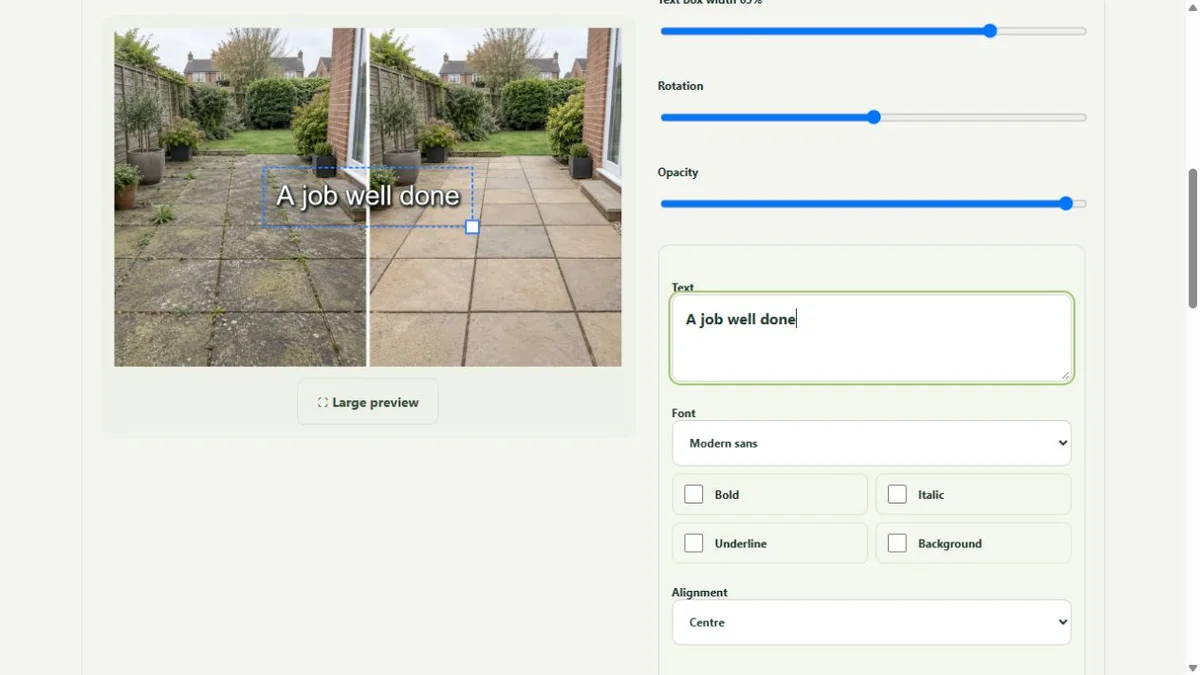
- Photo editing and before / after pairs
- Video trimming, subtitles and music
- Your company’s logo and contact details
- Office privacy review and approval
- Team access and publication records
Real work. Useful stories.
A few ways your team can turn everyday jobs into content.
A clean worth showing
Pair the same carpet or kitchen before and after the clean. Let the result explain the service.
Explore the use case →A technician’s explanation
Use a short, reviewed video to answer a recurring customer question about the work.
Explore the use case →A garden transformed
Show clearance, seasonal care or a finished border with consistent before and after framing.
Explore the use case →Your office stays in control.
Uploads are private. Office checks the photos, every frame of the video and the content’s context before approving public use.
Explore security and privacy →Capture ≠ approval
Company roles, private media and deliberate review support your team’s workflow. Permission to publish remains your business’s responsibility.
A few things you might be wondering
Do workers need video software on their computers?
No. Workers use the mobile web workspace. Video preparation runs on the service; they do not need Docker or desktop editing tools.
Can we use our own branding?
Yes. Choose the company brand when preparing content, and inspect the complete preview before exporting.
Does it publish directly to social networks?
Current workflows prepare downloadable content. Direct publishing integrations are separate and are not active in this release.
Can I start a self-service free trial?
Public self-service registration is not active yet. Request early access or discuss the workflow in a demo.
Can I add text to photos?
Yes. The photo editor supports multiple fonts, curved text, colours, outlines, shadows and movable layers.
Ready to show what your business can do?
Turn real jobs into consistent, branded content your office can review and use.
Discuss your team’s workflow with us.